Mastering how to write effective survey questions for trustworthy feedback
Learn how to write effective survey questions to minimize bias and collect honest, actionable feedback with practical SaaS examples.
Ever looked at a fresh batch of survey results and thought, "Well, that was useless"? You're not alone. It’s a frustratingly common story: teams spend time and money collecting feedback, only to end up with data that's confusing, misleading, or just doesn't answer the question they started with.
This almost always boils down to small, completely avoidable mistakes in how the questions were written. A poorly phrased question can totally derail your view of something as important as customer churn. You might think you're asking about product satisfaction, but a tiny bit of ambiguity can lead customers to answer about their latest support ticket instead.
The result? You end up making decisions based on faulty data, pouring resources into the wrong features, or completely misdiagnosing why users are leaving.
The Real Impact of Vague Wording
How you word a question is a big detail because it shapes the answers you get back.
For example, asking "How do you like our new feature?" is way too vague. Some people will interpret "like" as usability, while others might think about its value or even its design. A much better approach is to break it down into specific, separate questions: "How easy was it to use the new feature?" and "How valuable is this new feature to your workflow?"
This kind of precision is everything. Decades of survey research have shown that the exact wording of questions and response options can dramatically change the outcomes. One major study found that slight phrasing differences produced swings of 3–8 percentage points in reported vote intention.
For SaaS teams using in-product surveys, a 5% swing in reported intent could change the estimated number of at-risk customers by thousands for a 100,000-user product. If you want to check it out yourself, see the research from Kantar on the power of question phrasing.
Common Pitfalls That Lead to Bad Data
A few classic mistakes can tank a survey before it even reaches a customer. Spotting these is the first step to writing questions that deliver clear, actionable insights.
Keep an eye out for these common culprits:
- Leading Questions: These subtly nudge the respondent to a particular answer. Think: "How much did you enjoy our amazing new dashboard?" This just assumes the user had a great time.
- Double-Barreled Questions: This is when you cram two questions into one, making it impossible to answer accurately. For example, "Was our customer support fast and helpful?" Support could have been super helpful but painfully slow.
- Using Jargon: Questions filled with internal company acronyms or overly technical terms will just confuse people. Always write from the user's perspective, using language they actually know.
The goal of a survey is to collect truth, not just answers. Biased or confusing questions get you neatly organized data that tells you nothing about what your customers actually think or need.
By getting a handle on these common mistakes, you can start to see why some survey results just don't hit the mark. The rest of this guide will walk you through how to sidestep these pitfalls and craft questions that get you the insights you need to grow your business.
Defining Your Survey's Core Purpose
Jumping straight into writing questions without a clear goal is like trying to build a house without a blueprint. You might end up with something, but it probably won’t be the sturdy, functional structure you actually need. Before you type a single word, you have to nail down exactly what you're trying to achieve.
The most important question to answer is this: What specific business decision will these survey results help you make? Getting this right is the foundation of everything that follows.
From Vague Ideas to Specific Goals
Lots of teams start with a broad goal, and that's okay as a first step. But to get data you can actually use, you need to sharpen that idea into something specific. A general goal like "find out about customer churn" is just too wide and it doesn't give you any direction on what to ask.
Let's refine it. A much more actionable goal would be: "Identify the top three feature gaps causing users on our Pro plan to cancel their subscription in the first 30 days."
See the difference? This goal is specific, measurable, and directly tied to a business problem. It immediately tells you who to survey (recently canceled Pro users) and what kind of information you need (feedback on missing features). Without this clarity, you risk falling into a common trap.
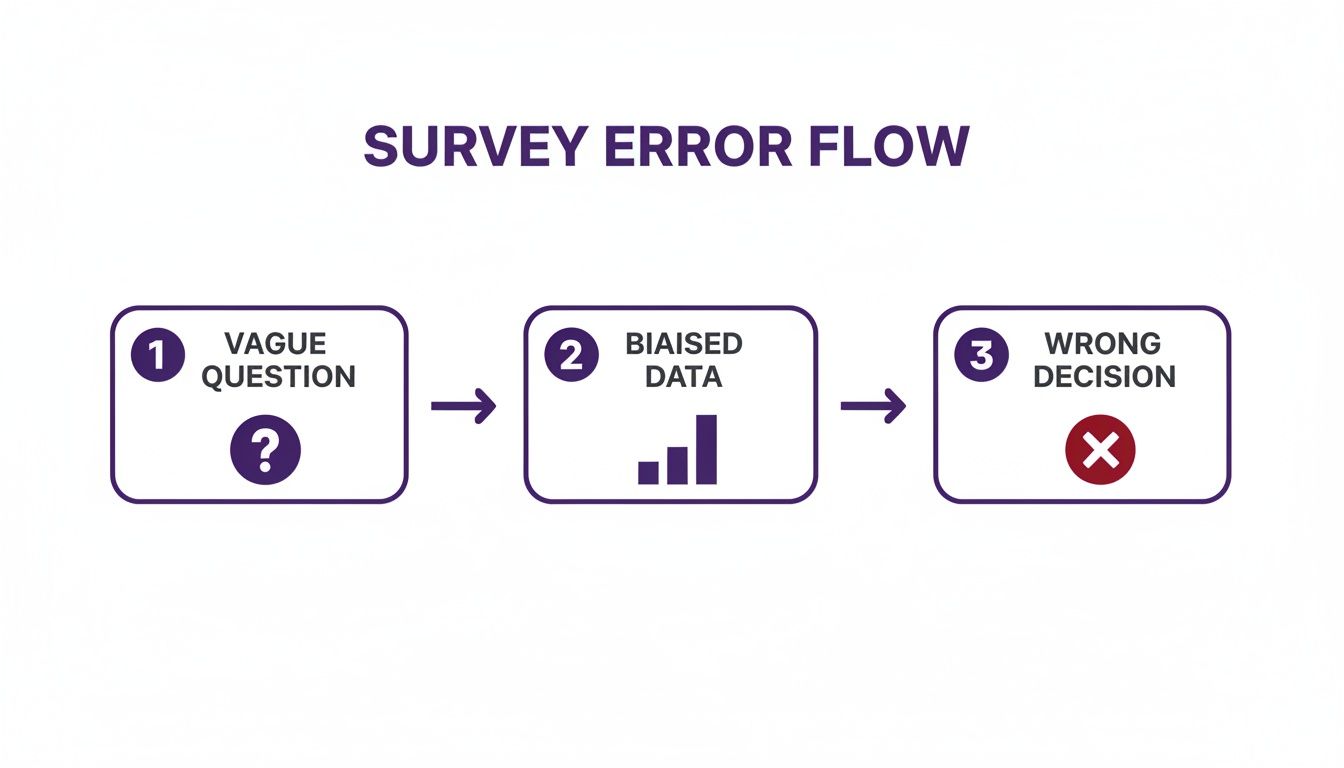
As the chart shows, a fuzzy purpose leads to ambiguous questions, which churns out unreliable data and, ultimately, results in flawed business decisions. It's a domino effect you want to avoid at all costs.
Matching Survey Goals to Question Types
To help you get started, here's a quick reference for connecting your primary objective to the most effective question format.
This table isn't exhaustive, but it provides a solid framework for aligning your "why" with the "how" of your survey design.
Selecting the Right Audience Segment
Once your objective is crystal clear, the next step is deciding who to ask. Blasting a survey to your entire user base is almost never the right move. Different user segments have wildly different experiences and perspectives.
Think about it, asking a brand-new user about long-term value doesn’t make sense. And you won't get fresh insights by asking a power user about their onboarding experience from two years ago.
Here’s how to match your audience to your goal:
- New Users (First 7-30 days): Perfect for feedback on the onboarding flow, first impressions, and any immediate roadblocks.
- Power Users (High activity/long tenure): Your go-to source for feedback on advanced features, ideas for new products, and finding out what keeps them loyal.
- Recently Churned Users (Canceled in last 30 days): The only group that can give you the unvarnished truth about why they left. They are very important for any churn reduction effort.
- Low-Engagement Users (Inactive for 30+ days): Great for uncovering the barriers that are stopping them from getting value out of your product.
Knowing your audience is fundamental, and surveys are a fantastic tool to gather the data needed to create buyer personas that actually work.
By defining a single, clear objective and targeting the right audience, you've already won half the battle. This focus makes writing the actual questions far easier and means the data you collect will be immediately useful.
Turn Your Goal Into Key Research Questions
With a sharp objective and a defined audience, the final step before writing is to break your goal down into a few core research questions. These aren't the questions your users will see; they are high-level questions for your team to answer.
Let's go back to our churn goal. The research questions could be:
- Which competing products did these users switch to?
- What specific features did they expect to find but didn't?
- Was price a primary factor in their decision to cancel?
These questions become your North Star. Every single question you write for the final survey must help answer one of these core research questions. If it doesn't, cut it. This discipline keeps your surveys tight and focused, which respects your customers' time and dramatically increases the quality of your data.
How to Craft Clear and Unbiased Questions
With a solid goal in place, it's time to get down to the real work: writing the questions. This is the moment of truth, the point where so many surveys fall flat. Crafting questions that are crystal clear, sharply focused, and free from bias is the only way to get data you can actually trust.
It's all about making it effortless for people to give you honest, accurate answers.

The best questions feel simple and direct. They leave no room for interpretation and don't subtly nudge the respondent to a certain answer. Let's look at how to get there.
Keep Your Language Simple and Direct
One of the fastest ways to confuse users is to hit them with jargon, acronyms, or overly technical language. You might live and breathe terms like "API integration latency" or "UI component library," but your customers almost certainly don't. Always write from their perspective.
- Before: "How would you rate the efficacy of our platform's asynchronous data processing capabilities?"
- After: "How satisfied are you with the speed of the platform when saving your work?"
The "after" version works because it's in plain English anyone can know. It zeroes in on the user's experience (speed) rather than the technical wizardry making it happen.
Pro Tip: Read your questions out loud. If they sound clunky, overly formal, or confusing when you say them, they will definitely be confusing for your respondents to read. If you have to re-read a question just to get it, it needs a rewrite.
Focus on One Idea per Question
This one is huge. A "double-barreled" question tries to cram two things into one, making it impossible for someone to give a single, accurate answer. It’s a common mistake that will completely contaminate your data.
Imagine you ask, "Was our onboarding process quick and easy to follow?"
What if the process was lightning-fast but incredibly confusing? Or what if it was simple to follow but took forever? The respondent can't truthfully answer "yes" or "no."
The fix is simple: just split it into two separate questions.
- "How would you rate the speed of our onboarding process?"
- "How easy was it to follow the steps in our onboarding process?"
Now you get clean, actionable data on two distinct parts of the experience. You can pinpoint exactly where the friction is.
Avoid Leading or Loaded Language
A leading question subtly guides the respondent to the answer you want to hear. This creates biased data that just confirms what you already think, which is totally useless for making real improvements. You can explore this topic further in our guide on recognizing and avoiding biased questions in a survey.
Here’s a classic example of a leading question:
- Leading: "How much did you enjoy our amazing new reporting feature?"
The word "amazing" presupposes a positive experience, pressuring the user to agree. A neutral version is far more powerful.
- Neutral: "How would you rate your experience with our new reporting feature?"
This revised question gives the user space to provide their genuine opinion, whether it's good, bad, or somewhere in between. These same principles for crafting clear questions are also valuable when conducting effective user interviews to get deeper qualitative insights.
Choose the Right Question Type for the Job
The format of your question is just as important as the words you use. Different question types are built for gathering different kinds of information. Here are the main players and when to deploy them.
- Multiple-Choice: Best when you have a limited set of possible answers. This gives you clean, quantitative data that’s a breeze to analyze. Pro tip: always include an "Other (please specify)" option to catch answers you didn't see coming.
- Rating Scales (Likert, NPS): Perfect for measuring sentiment, satisfaction, or agreement. These scales (e.g., "On a scale of 1-10" or "Strongly Disagree to Strongly Agree") provide quantifiable data on attitudes and feelings.
- Open-Ended: Use these to get the "why" behind the numbers. They deliver rich, qualitative insights that can uncover problems or ideas you never would have thought of. Just remember they take more effort to answer, so use them sparingly.
Your choice of response options can also introduce bias. For example, the difference between a 4-point and a 5-point Likert scale can shift the proportion of positive responses by as much as 5–12 percentage points in market research settings.
Here’s a practical example of how you can combine question types in a SaaS churn survey:
- Multiple-Choice: "What was the primary reason for canceling your account?" (Options: "It was too expensive," "I'm missing a key feature," "It was too difficult to use," "I no longer need it," "Other")
- Open-Ended (Conditional): If the user selects "I'm missing a key feature," you can follow up with: "Which feature were you looking for that we don't currently offer?"
This one-two punch gives you clean, quantifiable data on why people are leaving, plus specific, qualitative feedback you can take directly to your product team.
Question Templates for Common SaaS Scenarios
Knowing the theory behind writing good survey questions is one thing, but staring at a blank page can still feel hard. It’s so much easier to get started when you have a solid foundation to build from. That's why I've put together some ready-to-use templates for the most common feedback needs in SaaS.
Think of these as a starting point. They're designed to be copied, tweaked, and rolled out quickly. Just make sure to adjust the language to match your product's voice and your specific goals.

Starting with proven templates helps you sidestep common mistakes and jump right into adapting the questions for your unique users and product.
Onboarding Feedback Surveys
The first few days of a user's journey are make-or-break. A sharp onboarding survey can help you spot friction points that might otherwise lead to a user quietly slipping away. The goal here is to get a read on their first impression and find any immediate roadblocks they ran into.
I recommend triggering this survey about 3-7 days after a user signs up. This gives them enough time to poke around but keeps the experience fresh in their mind.
Sample Onboarding Questions:
Multiple-Choice: What was the main reason you signed up for [Your Product Name]?
- To solve [Problem X]
- To replace [Competitor Tool]
- A colleague recommended it
- Just exploring options
- Other (please specify)
Rating Scale (1-5): How easy was it to get started with [Your Product Name]? (1 = Very Difficult, 5 = Very Easy)
Multiple-Choice: What was the biggest challenge you faced during your first week?
- Setting up my account
- Figuring out the main features
- Integrating it with other tools
- I didn’t run into any challenges
- Other (please specify)
Open-Ended: Is there anything you hoped to do with [Your Product Name] that you couldn't figure out?
This mix of questions gives you quantitative data on the setup process and rich qualitative insights into what your users want and where they get stuck.
Net Promoter Score (NPS) Surveys
The Net Promoter Score is a classic for a reason. It's a quick, simple metric for tracking customer loyalty and overall satisfaction over time. While the core question is always the same, the real gold is in the follow-up question.
Send NPS surveys at regular intervals, maybe quarterly or biannually, to keep a pulse on customer sentiment and spot any trends.
Standard NPS Questions:
Rating Scale (0-10): On a scale of 0 to 10, how likely are you to recommend [Your Product Name] to a friend or colleague?
Open-Ended (Conditional): The follow-up you show depends on their score:
- For Promoters (Score 9-10): What do you love most about [Your Product Name]?
- For Passives (Score 7-8): What could we do to make your experience even better?
- For Detractors (Score 0-6): What was the main reason for your score?
Multiple-Choice: What's the primary reason you're canceling your account?
- The price is too high.
- It's missing a key feature I need.
- The product is too complicated.
- I switched to a different product.
- My project ended / I don't need it anymore.
- I had a bad experience with customer support.
- Other (please specify)
Open-Ended (Conditional): Based on their answer, you can dig a little deeper with a targeted follow-up.
- If "The price is too high": What price would have felt right for you?
- If "It's missing a key feature": Which feature(s) were you looking for?
- If "I switched to a different product": Which product did you decide to go with?
- Email Surveys: These are fantastic for getting longer, more detailed feedback from engaged users. It gives them the flexibility to respond whenever it's convenient.
- In-App Surveys: Perfect for grabbing short, contextual feedback. A quick 1-2 question pop-up right after a user does something specific can give you incredibly relevant insights.
- Get Personal: Use their name if you can. A simple "Hi [FirstName]" is far more effective than a generic "Hello customer."
- Explain the "Why": Tell them the purpose of the survey. "Help us improve our new dashboard" is much more compelling than "Take our survey."
- Set Expectations: Be upfront about the time commitment. Saying "This will only take 2 minutes" removes any uncertainty and makes it feel manageable.
- Offer an Incentive (If It Makes Sense): For longer surveys, a small incentive like a gift card, a discount, or entry into a giveaway can seriously boost your response rates.
- Multiple-choice and rating scale questions are your go-to for quantitative data. They’re clean, easy to analyze, and perfect for spotting trends and creating charts that make sense at a glance.
- Open-ended questions are where you get the gold. They deliver rich, qualitative insights, the "why" behind the numbers. This is often where you'll find the problems or brilliant ideas you never would have thought to ask about.
The true power of NPS is the "why" behind it, not the number itself. Those open-ended follow-ups give you the context you need to figure out what’s driving loyalty or creating frustration.
Churn and Cancellation Surveys
Figuring out why people leave is one of the most important feedback loops for any SaaS business. A well-designed churn survey, placed right in the cancellation flow, can deliver some brutally honest feedback that helps you fix the real reasons for attrition.
The trick is to make it incredibly easy to answer, focusing on the single biggest reason they're leaving.
Sample Churn Survey Questions:
This approach gives you clean, reportable data on your main churn drivers while also capturing specific, actionable details. If you're looking for more inspiration, you can find a whole library of free customer survey templates that cover different scenarios. These resources can be a huge help when you need to get a survey out the door fast.
Designing Surveys People Will Actually Finish
Even the most brilliant questions are useless if your survey is dead on arrival. A good survey is about creating an experience that feels simple, logical, and respectful of your customer's time. A few small tweaks to the flow and delivery can be the difference between a handful of responses and a goldmine of data.
The goal is to make your survey feel less like a chore and more like a quick, easy chat. When people feel like you've made the process painless, they're much more likely to share what they're thinking.
Create a Logical Question Flow
The order of your questions really matters. A jumbled or confusing sequence will frustrate people and cause them to bail halfway through. The best approach is to structure your survey like a funnel.
Start with broad, easy questions. Think demographic or general satisfaction questions that don’t require much brainpower. This warms people up and gets the momentum going.
From there, you can gradually move into the more specific or detailed questions. I always save any sensitive or open-ended questions for the very end, after I've built some trust and engagement.
Keep It Short and Show Progress
In surveys, shorter is almost always better. Every single question you add increases the odds that someone will drop off. Before you hit "send," go through every question and ask yourself, "Is this absolutely needed for my goal?" If the answer is no, cut it.
For those times when a survey just has to be a bit longer, managing expectations is everything. Always give people a clear idea of how long it will take. One of the most effective ways to do this is with a progress bar.
A progress bar gives a simple visual cue of how much is done and how much is left. It’s been shown to reduce survey abandonment by creating a sense of forward momentum and accomplishment. People like to finish what they start.
Choose the Right Channel for Your Survey
Where and when you ask for feedback is just as important as what you ask. For most SaaS companies, the two go-to channels are email and in-app prompts, and each has its own strengths.
The delivery channel and timing are quantifiable levers you can pull. Research shows email invites with a clear subject and one follow-up can lift the open-to-response conversion by about 30–50% compared to a single ask. On the flip side, embedding short in-app surveys (1–3 questions) often boosts completion rates by 15–35% over sending users to an external link, because the request is so immediate and relevant.
Write Compelling Survey Invitations
Your survey invitation is your sales pitch. Whether it's an email subject line or an in-app headline, you have just a few seconds to convince someone their feedback is worth their time.
Here are a few tips that I've found work wonders:
Crafting a great survey experience comes down to a lot of small but significant choices. If you're looking for more ways to get users on board, you might find our guide on how to improve your survey response rate helpful.
Answering Your Top Survey Design Questions
Even when you've got a solid plan, a few common questions always seem to pop up during the survey design process. Let's tackle some of the most frequent ones I hear, so you can fine-tune your approach and pull in the best data possible.
How Long Should My Survey Be?
Ah, the million-dollar question. While there's no single magic number, shorter is almost always better. For most of the quick-hitter SaaS surveys, like NPS or post-onboarding feedback, you should be aiming for 1-3 questions. Think of these as quick, in-the-moment snapshots.
When you need to dig a little deeper for things like churn analysis or serious product research, try to cap it at 10-12 questions. This should take someone less than five minutes to complete. The core idea here is simple: respect your user's time. If a question is just a "nice-to-have" but doesn't directly serve your main goal, cut it. Be ruthless.
For anything more than a few questions, a progress bar is your best friend. It shows people the finish line is near, which does wonders for completion rates. It’s a small psychological trick that really works.
Should I Use Open-Ended or Multiple-Choice Questions?
You absolutely need both. They serve completely different purposes, and honestly, they work best as a team.
A classic, effective combo is to lead with a multiple-choice question to pinpoint an issue, then follow up with an optional open-ended question for more color. This structure gives you the best of both worlds without making your users feel like they’re writing an essay.
How Can I Avoid Survey Fatigue?
Survey fatigue is a very real problem, and it will tank your response rates and data quality if you're not careful. The key is to be strategic and considerate.
First off, stop surveying everyone all the time. Get smart with your segmentation. Target specific user groups with questions that are actually relevant to their experience. A brand new user has a completely different perspective than a five-year power user, so don't ask them the same things.
Next, mix it up. Don't rely on one method. Use a blend of email surveys for in-depth feedback, in-app pop-ups for super-contextual questions, and maybe an embedded widget for passive, always-on feedback. This keeps any single channel from feeling spammed.
Finally, and this is huge, close the loop. Show people you're actually listening. If you ship a feature or squash a bug because of survey responses, shout it from the rooftops. When users see their feedback actually drives change, they become far more willing to help out next time.
Ready to turn user feedback into growth? With Surva.ai, you can create intelligent, AI-powered surveys that uncover why users churn, convert, and stay. Start building surveys that deliver actionable insights today. Learn more at Surva.ai.

Sophie Moore
Sophie is a SaaS content strategist and product marketing writer with a passion for customer experience, retention, and growth. At Surva.ai, she writes about smart feedback, AI-driven surveys, and how SaaS teams can turn insights into impact.