

Chat with your AI visibility data
Ask Surva turns your AI visibility data into actionable insights through natural conversation. Discover prompts, compare competitors, find gaps, and generate content strategies - all by asking a question.
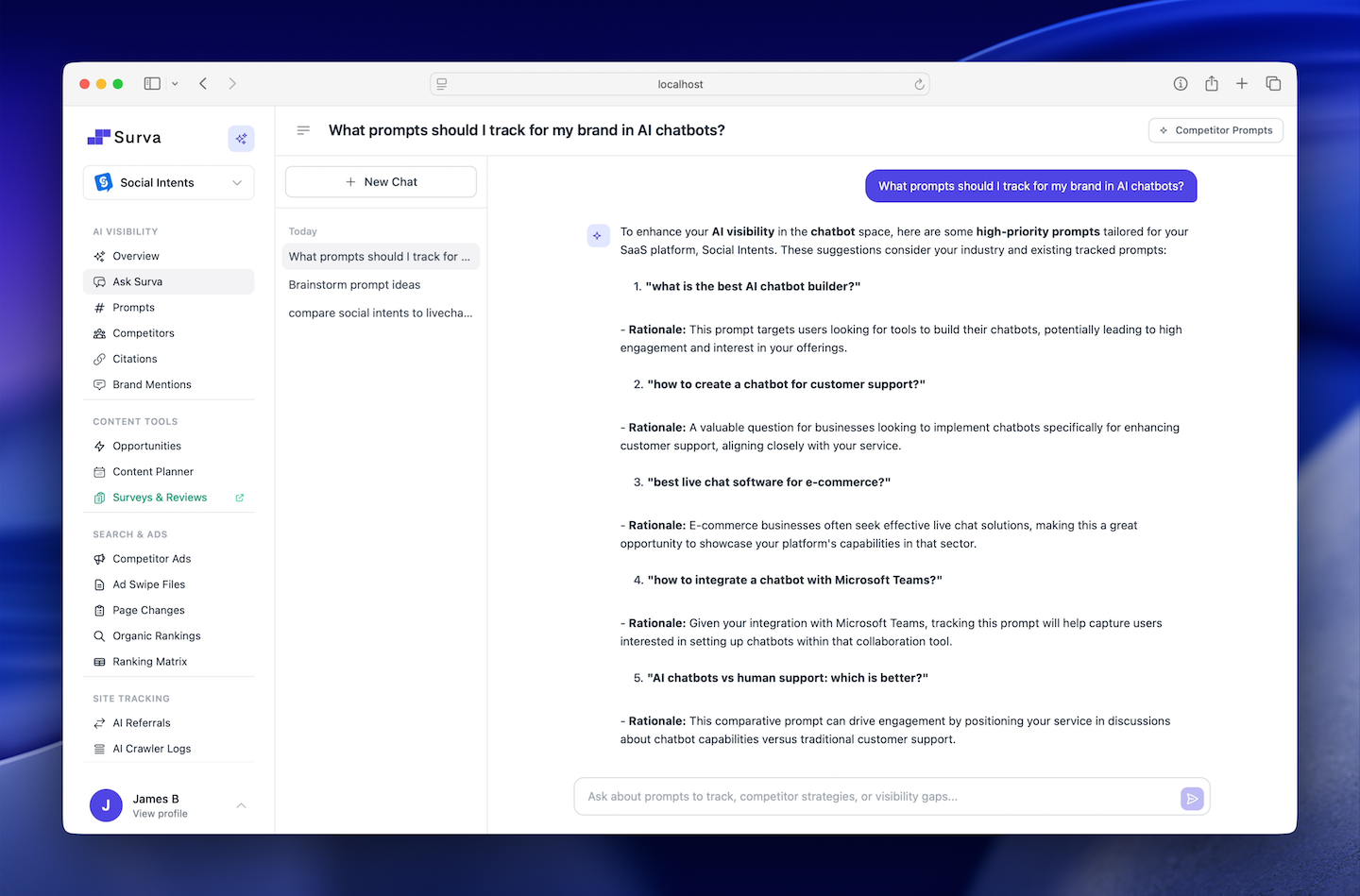
Ask questions in plain English and get data-driven answers from your Surva.ai account
ChatGPT, Perplexity, Claude, Gemini, AI Overviews
Prompts, competitors, mentions, citations, rankings, ads
Track prompts, add competitors, create content from chat
Query your visibility data from Microsoft Teams
Your visibility data shouldn't require a manual to understand
Most AI visibility platforms give you data. Ask Surva gives you answers. There's a big difference between staring at a dashboard and knowing what to do next.
The old way: navigate and guess
You open your dashboard, see a chart, and spend the next 20 minutes cross-referencing tabs to figure out what happened. You check the prompts table, then the competitor view, then the gaps page. By the time you have an answer, you have forgotten the original question.
The Ask Surva way: just ask
Type your question in plain English. Ask Surva reads your live account data across all 15+ data sources, synthesizes it, and gives you a specific, actionable answer in seconds - with charts, tables, and one-click actions to implement the recommendation immediately.
Three things that make Ask Surva different
Grounded in your data
Ask Surva never makes things up. Every answer is sourced from your specific tracked prompts, competitors, mentions, and citations. The AI can only say what your data actually shows.
From insight to action instantly
Ask Surva doesn't just show you what's happening - it puts action buttons in the chat. Track a prompt, add a competitor, open the content editor pre-filled with an article idea. The gap between knowing and doing closes to one click.
Works for your whole team
Not everyone on your team wants to learn a new analytics tool. Ask Surva works in plain English. A founder can ask "how are we doing?" and get the same quality of analysis as your most experienced SEO strategist.
Your AI Visibility Data, One Question Away
Ask Surva connects to every data source in your Surva.ai account and turns complex analytics into clear, actionable answers.
Prompt Discovery
Ask "What prompts should I track?" and get suggestions based on your brand, industry, and competitors. Track them with one click directly from the chat.
Competitor Comparison
Ask "How do I compare to [competitor]?" and see side-by-side visibility scores, mention counts, citations, top prompts, and specific gaps between your brands.
Gap Detection
Ask "Where are my visibility gaps?" and instantly see prompts where competitors appear but you don't - with priority scores and recommended actions.
Content Strategy
Ask "What content should I create?" and get article ideas tied to your gaps. Click Create to open the Content Wizard pre-filled and ready to publish.
Mention Trends
Ask "How are my mentions trending?" and see inline charts with weekly gains, losses, per-platform breakdowns, and which prompts are driving changes.
Inline Charts and Tables
Every answer comes with visual data - line charts for trends, bar charts for comparisons, tables for rankings, and cards for prompt suggestions.
Questions Your Team Asks Every Day
Ask Surva answers the questions that used to take hours of dashboard navigation and spreadsheet analysis.
Prompt Research
Competitor Intelligence
Gap Analysis
Content Creation
From Question to Action in Seconds
Ask Surva is not a generic chatbot. It reads your account data in real time and gives answers grounded in your actual visibility metrics.
Ask a Question
Type any question about your AI visibility, competitors, prompts, gaps, trends, or content strategy. Use natural language - no special syntax needed.
AI Analyzes Your Data
Ask Surva queries your tracked prompts, competitors, mentions, citations, rankings, ads, and gaps in real time. It uses 15+ data sources from your account.
Get Answers and Act
Receive data-driven answers with charts, tables, and actionable suggestions. Track prompts, add competitors, or create content with one click - all from the chat.
Rich Responses With Built-In Actions
Ask Surva doesn't just give you text answers. It renders visual data and lets you take action without leaving the conversation.
Each suggestion includes a rationale, priority badge, and one-click tracking. Expand any prompt to see variations.
Inline Charts
Line charts for trends, bar charts for competitor comparisons, doughnut charts for platform breakdowns - rendered directly in the chat.
Formatted Data Tables
Competitor comparisons, ranking positions, citation counts, and gap analysis presented in clean, readable tables.
One-Click Actions
Track suggested prompts, add recommended competitors, or open the Content Wizard pre-filled with article ideas - all without leaving the chat.
Saved Queries
Bookmark your best questions and re-run them anytime. Save up to 20 queries for quick access to the insights you check regularly.
Built for Every Team That Tracks AI Visibility
Whether you are a solo marketer or running visibility for an agency, Ask Surva saves hours of manual analysis.
Marketing and SEO Teams
Morning visibility check in 30 seconds
Ask "What changed this week?" and get a complete summary of new mentions, lost positions, surging prompts, and competitor moves.
Data-driven content calendars
Ask "What content should I create to close my gaps?" and get article topics tied directly to visibility opportunities with ROI estimates.
Instant competitive research
Compare any two brands, discover market gaps, and understand what content gets competitors cited by AI platforms.
Agencies and Consultants
Client reporting in seconds
Ask "Summarize visibility changes this month" and copy the data-rich answer directly into client reports and presentations.
Onboard new clients faster
Add a new brand and ask "What prompts should we track?" to get an instant research overview for prompt tracking strategy.
Teams integration for collaboration
Team members can query visibility data from Microsoft Teams without needing to log into the Surva.ai dashboard.
Powered by the Full Surva.ai Platform
Ask Surva connects to every tool in your Surva.ai account. The more data you track, the smarter the answers.
AI Visibility
Brand mention tracking across 5 AI platforms and Google AI Overviews
Search Prompt Tracking
Monitor which prompts mention your brand and discover new ones to track
AI Citation Tracking
Track which of your URLs are cited as sources by AI platforms
Competitor Intelligence
Compare AI visibility, ads, and rankings against tracked competitors
AI Content Optimization
Generate citation-optimized content and publish directly to your CMS
AI Referral Tracking
Measure traffic driven to your site from AI platforms
Frequently Asked Questions About Ask Surva
Everything you need to know about using the AI visibility assistant.
What is Ask Surva?
Ask Surva is an AI-powered chat assistant built into the Surva.ai platform. It connects to your account's visibility data - tracked prompts, competitors, AI mentions, citations, organic rankings, and ads - and lets you analyze everything through natural conversation. Instead of navigating dashboards, you can ask questions like "Which competitors appear in prompts where I don't?" and get instant, data-driven answers.
What kind of questions can I ask?
You can ask about prompt discovery (suggest new prompts, brainstorm variations), competitor analysis (compare visibility, ad strategies, ranking positions), visibility gaps (where competitors appear but you do not), content strategy (article ideas tied to gaps), brand mention trends (weekly changes across platforms), citation data (which URLs AI engines cite), and platform help (how to use Surva.ai features).
How does Ask Surva access my data?
Ask Surva reads your tracked prompts, competitors, brand mentions, citations, organic rankings, ad data, competitive gaps, and insights in real time. Every answer is grounded in your actual Surva.ai account data, not generic advice. It pulls from 15+ data sources including mentions across ChatGPT, Perplexity, Claude, Gemini, and Google AI Overviews.
Can Ask Surva help me find new prompts to track?
Yes. Prompt discovery is one of Ask Surva's core capabilities. It analyzes your brand, industry, competitors, and geographic focus to suggest high-value prompts your customers are asking AI platforms. You can track suggested prompts with one click directly from the chat, expand any suggestion into variations, or brainstorm entirely new prompt ideas. Learn more about Search Prompt Tracking.
Does Ask Surva compare me against competitors?
Yes. Ask Surva compares your brand's AI visibility side-by-side against any tracked competitor. It shows visibility percentages, mention counts per platform, top prompts each brand appears in, citation differences, and specific gaps. You can also ask it to recommend new competitors to track based on your industry.
Can it help with content creation?
Ask Surva brainstorms data-driven content ideas tied directly to your visibility gaps. It suggests article topics, outlines, and content types. Each suggestion includes a one-click Create button that opens the Content Wizard pre-filled with the topic, so you can go from insight to published content in minutes.
What platforms does Ask Surva cover?
Ask Surva provides intelligence across all five AI platforms tracked by Surva.ai: ChatGPT, Perplexity, Claude, Gemini, and Google AI Overviews. It also covers organic search rankings, paid advertising data, and citation sources from each platform.
Does it show charts and visual data?
Yes. Ask Surva renders inline Chart.js charts (line, bar, and doughnut), formatted data tables, and visual comparison cards directly in the chat. When you ask about trends, competitor comparisons, or platform breakdowns, the assistant displays the data visually alongside its written analysis.
Is Ask Surva available on Microsoft Teams?
Yes. Ask Surva integrates with Microsoft Teams for single-turn queries. Your team can ask visibility questions directly from Teams without switching to the Surva.ai dashboard. The Teams integration uses the same real-time data as the web-based chat.
How is Ask Surva different from ChatGPT or other AI chat tools?
Ask Surva is connected to your live Surva.ai account data. Unlike general AI chat tools that can only give generic advice, Ask Surva knows your specific tracked prompts, competitors, mentions, rankings, citations, and visibility scores. Every answer is personalized to your brand and grounded in real data, not general knowledge.
Part of the Surva.ai platform
Ask Surva is one feature inside Surva.ai. The answers are only as powerful as the data behind them.
AI Citation Tracking
Ask Surva draws on your citation data - track more keywords and platforms to get richer, more accurate answers.
Competitor Intelligence
Ask questions about competitor gaps, ad strategies, and AI share of voice - all grounded in live competitor data.
Search Prompt Tracking
Ask which prompts you should target next - your prompt tracking data feeds directly into Ask Surva's recommendations.